
The Techjoomla Blog
Stay updated with all the latest happenings at Techjoomla. From news about the developments in your favourite extensions to Tips & Tricks about the Joomla CMS, Framework & Development.
1 minute reading time
(211 words)
How to get ‘btn-group’ buttons in plain html?

We all know how to get those nice colored buttons for Radio form field type, its by adding class="btn-group” in the xml argument for that field.
There can be an exception to this, if you are not able to have a form field in your view? And you still crave for those nice colored buttons?
Here is how you can have those buttons with some plain HTML, CSS and bootstrap!
Following is a sample HTML for a radio field for yes no option which, you will need in your layout file.
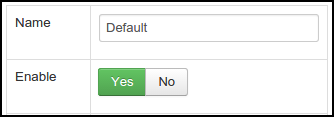
Place this CSS styling in your css file
.yes_no_toggle input {
	display: none;
}
.yes_no_toggle label.first {
	border-radius: 3px 0 0 3px;
}
The JavaScript required
jQuery(document).ready(function(){
	jQuery( '.yes_no_toggle label' ).on( "click", function() {
		var radio_value = yesnoToggle(this);
	});
});


function yesnoToggle(elem)
{
	var radio_id = jQuery(elem).attr("for");

	jQuery("#"+radio_id).attr("checked", "checked");
	/*for jQuery 1.9 and higher*/
	jQuery("#"+radio_id).prop("checked", true)

	var radio_value = jQuery("#"+radio_id).val();
	jQuery(elem).parent().find("label").removeClass("btn-success").removeClass("btn-danger");

	if(radio_value == 1)
	{
		jQuery(elem).addClass("btn-success");
	}
	if(radio_value == 0)
	{
		jQuery(elem).addClass("btn-danger");
	}

	return radio_value;
}
That's it! You should have the nice looking buttons same as the radio form field in your plain html views. You are free to modify the above codes according to your requirement. :)
Note: This Blog is purely targeted towards developers!
Stay Informed
When you subscribe to the blog, we will send you an e-mail when there are new updates on the site so you wouldn't miss them.
